A clear and well-thought-out URL structure is the key to good user navigation and strong SEO ranking.
With the ability to set both a path and a slug for each page in the JobShop, you can now design your URLs even more precisely and clearly. This benefits not only search engines, but also your users, who will find it easier to navigate and discover content.
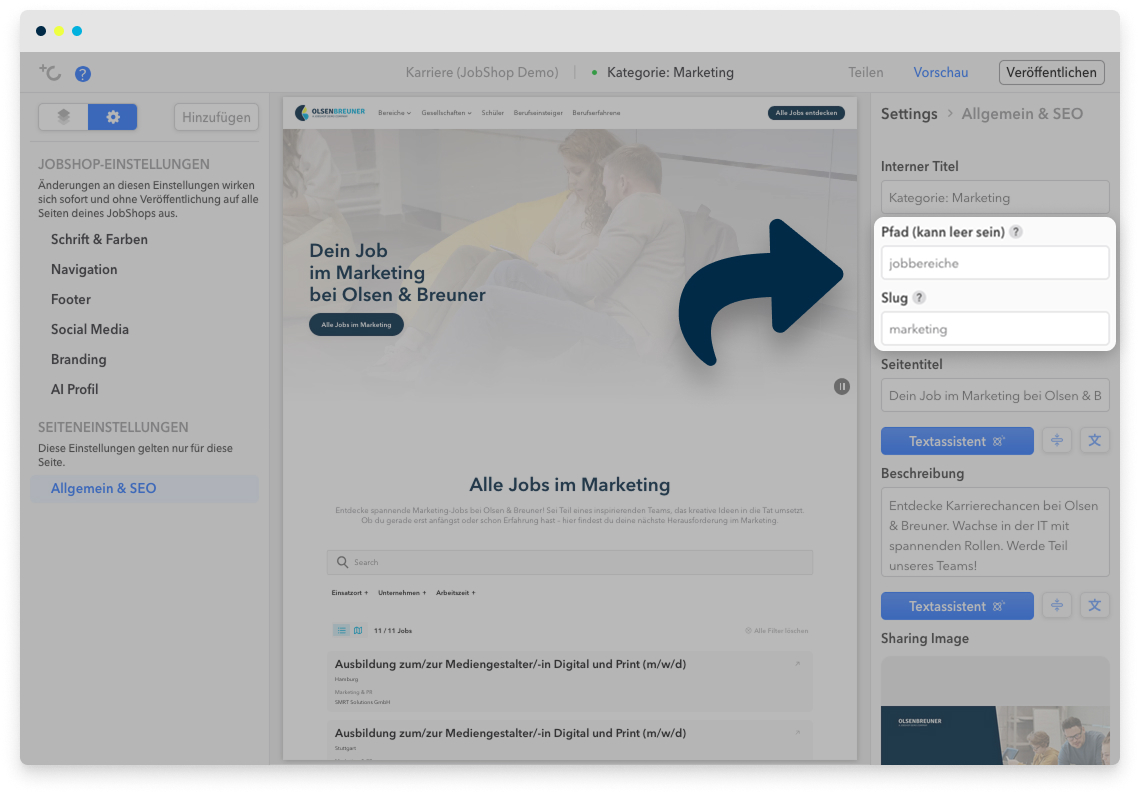
In the JobShop editor, you can define both a path and a slug for each page. This allows you to create a URL structure for your JobShop that is clear, user-friendly, and optimized for search engines.
Note: Manual update of links required
If you add a new path to an existing page or change the path of an existing page, all previous links to that page will no longer work automatically.

Please update all internal links in the JobShop manually. External links (e.g. from campaigns or social media) must also be updated.

Automatic redirects will be made available at a later date.
Contents
- What are Path and Slug?
- Why you should always create a path overview page
- How to set up paths and slugs correctly
- Examples of link structures
- FAQ
What are Path and Slug?
- Path
The path defines the directory level of your URLs, e.g. /job-areas/ for all pages belonging to a job category. A clear path structure helps search engines to better understand and evaluate your pages. Currently, only first-level paths are possible, e.g. /job-areas/. Multi-level path structures (e.g. /job-areas/marketing/subcategory/) are not supported, in order to keep the structure clear and simple. - Slug
The slug is the last part of the URL that uniquely identifies the page, e.g. /job-areas/marketing for the "Marketing" category. A short, concise slug in the language of your target audience improves both discoverability in search engines and user-friendliness.
Important:
For the home page, the path and slug must be left empty so that it remains accessible under the main domain.
Why you should always create a path overview page
Every path such as /job-areas/ is more than just a technical part of the URL. An overview page for your path offers clear advantages:
Better discoverability in search engines
Search engines recognize hierarchical structures. A well-maintained page like /job-areas/ strengthens the visibility of all subpages such as /job-areas/marketing.
Optimal internal linking
From the overview page, you can link to all subpages and thus optimize your internal link structure – an important SEO factor.
Better user experience
Users who only access the path will not land on a 404 page, but will instead find a useful overview with further links.
Individual ranking potential
Overview pages can rank for relevant search queries when maintained with appropriate content and meta tags.
How to set up paths and slugs correctly
Would you like to group all job categories under a common path and create a clear structure? Then proceed as follows:
1. Choose the right path
- Decide on, for example, /job-areas/ as the path for all category pages.
- Choose a short, descriptive name that users and search engines can understand immediately.
- Note that only first-level paths are possible, in order to keep the URL structure simple and clear.
2. Create the overview page for the path
- Create a page accessible at www.yourjobshop.com/job-areas/.
- Add an overview of all job categories here, e.g. using the Cards module (Marketing, Sales, IT, etc.).
- This page serves as a central hub for users and improves internal linking.
- For this page, the value "job-areas" must then be entered in the "Slug" field in the page settings. The path field can be left empty.
3. Create or update the subpages
- Each subpage now receives the full path, e.g. www.yourjobshop.com/job-areas/marketing or …/sales.
- Check whether any existing pages need to be updated.
- In this step, the path and slug fields must of course both be filled in.
4. Update all internal links
- All links to the changed URLs must be updated manually, e.g. in the navigation, on custom pages, or on the home page of your JobShop.
5. Check the structure
- Visit all new URLs to make sure no 404 errors occur.
- Check that the slugs are short, concise, and in the language of your target audience.
- Optimize title tags, meta descriptions, and internal links.
Tip
Use the flexible navigation options to link directly to the subpages of a path from there – e.g. for linking all job categories.

However, if you want to link more than 10 subpages, we recommend linking only to the path overview page to keep your navigation clear and manageable.

Examples of link structures
Below you will find two examples showing different link structures depending on the specifications of your company or the purpose and focus of your JobShop.
A. Complex, very broad company structure with various target groups
If you have a company that
- needs to serve different target groups,
- has very diverse job areas,
- has various locations that are promoted independently,
- and has a very wide range of apprenticeship offerings.
| Page | Path | Slug |
| Home page ⤴ | - | - |
| Target group: Apprenticeships & cooperative education ⤴ | - | /ausbildung-duales-studium |
| Target group: Career starters ⤴ | - | /berufseinstieg |
| Target group: Experienced professionals ⤴ | - | /berufserfahrene |
| All job areas ⤴ | - | /jobbereiche |
| Job area: Digital & IT ⤴ | /jobbereiche | /digital-it |
| Job area: Marketing ⤴ | /jobbereiche | /marketing |
| Job area: x | /jobbereiche | /... |
| All locations | - | /standorte |
| Location: Cologne | /standorte | /koeln |
| Location: Berlin | /standorte | /berlin |
| Location: y | /standorte | /... |
| All apprenticeship trades | - | /ausbildungsberufe |
| Trade: Office communications | /ausbildung-duales-studium | /buerokommunikation |
| Trade: Electrician | /ausbildung-duales-studium | /elektroniker-in |
| Trade: z | /ausbildung-duales-studium | /... |
| etc. |
B. JobShop with a clear target group focus and diverse specialist areas
If you are structuring a JobShop that
- serves only one target group (e.g. school leavers with a focus on apprenticeships and higher education)
- and presents very diverse specialist areas
- as well as occupations.
| Page | Path | Slug |
| Home page | - | - |
| Electrical engineering | - | /elektrotechnik |
| Apprenticeship: Electrician | /elektrotechnik | /ausbildung-elektroniker |
| Apprenticeship: Industrial electrician | /elektrotechnik | /ausbildung-industrieelektriker |
| ... | ||
| Administration | - | /verwaltung |
| Apprenticeship: Office communications | /verwaltung | /ausbildung-buerokommunikation |
| Apprenticeship: Real estate agent | /verwaltung | /ausbildung-immobilien |
| Degree: Business administration | /verwaltung | /studium-bwl |
| ... | ||
| etc. |
FAQ
What happens if I change the path of a page?
All existing links to this page must be updated manually, as there is currently no automatic redirect.
How do I choose the best slug for SEO?
Short, concise slugs in the language of your target audience work best. Avoid special characters, umlauts, spaces, and unnecessarily long terms. The same applies to the path.
Do I need an overview page for every path?
Yes, a path overview page improves SEO, internal linking, and user experience. It also prevents users from landing on 404 pages.
What happens to existing pages without a path?
These remain accessible, but for more structure and discoverability, it is recommended to create new pages with a clear path and slug structure.
What do I need to keep in mind for the home page?
The path and slug of the home page must remain empty so that it is accessible under the main domain.
Can I create multi-level paths?
Currently, only first-level paths are possible, in order to keep the URL structure clear and simple.
Was this article helpful?
That’s Great!
Thank you for your feedback
Sorry! We couldn't be helpful
Thank you for your feedback
Feedback sent
We appreciate your effort and will try to fix the article